MOffice
Riseup Labs' metaverse virtual office: a 3D, avatar-based workspace where remote teams meet, talk and work together on the web.
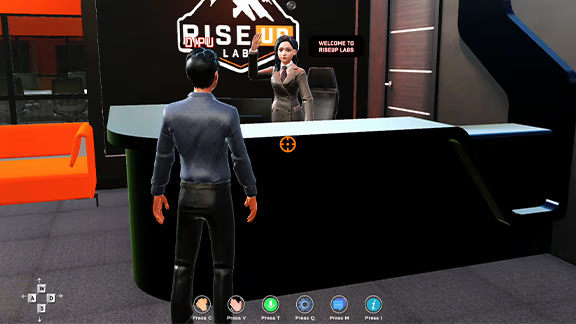 The MOffice reception, where every visit starts. Source: Riseup Labs, MOffice
What it is
MOffice is Riseup Labs’ metaverse virtual office. It recreates a real office as a 3D space in the browser, so remote and hybrid teams can feel like they are working in the same place. People create an avatar, walk through the office, and meet each other in shared rooms, with chat and voice in real time.
It serves two groups. The first is teams that work apart and miss the casual contact of an office: seeing who is in, catching someone after a meeting, walking over to ask a quick question. The second is businesses that want a branded 3D space for meetings, presentations and events, a place that feels like theirs rather than a generic video call.
The problem it tackles is the disconnect of remote work. Video calls handle scheduled meetings well, but they lose presence. Nobody bumps into anyone on a call. You cannot see who is around, and there is no hallway. MOffice tries to bring that back by giving every person a body in a shared space and every team a place to gather.
Riseup Labs describes the project as end-to-end product development in metaverse technology, with itself as the client. That matters: there was no outside customer handing over a brief. The product had to be defined from scratch, inside the company.
Industry
Virtual offices sit where remote-work tools meet the metaverse. After 2020, a wave of products tried to give distributed teams a sense of place, and they took very different routes.
- 2D, browser-first spaces such as Gather put avatars on a flat map, with audio and video that connect when people walk close to each other.
- Big-platform 3D spaces came from the largest companies. Microsoft made Mesh immersive spaces generally available inside Teams in January 2024, usable on a PC or a Meta Quest headset (Microsoft).
- VR-first rooms such as Meta’s Horizon Workrooms, first launched in 2021, bet on headsets. Meta closed Workrooms on 16 February 2026 as it moved spending away from VR (UploadVR).
The category has proved hard. Novelty gets a first visit; habit is what keeps a team coming back. The lesson from the closures is that access matters most. If joining needs a headset or a long install, most teams never get past the first try. MOffice runs on the web, with no headset needed, and uses the controls people already know from games: WASD keys or the mouse.
What happened
MOffice was one of the three products I owned at Riseup Labs, alongside the gaming platform Jeeto.Online and a CMS portal. I was the DRI for the gaming and metaverse products. MOffice was a new kind of product for the company, so the early work was about definition, not delivery speed.
Any virtual office has to answer three questions, and they framed the definition work:
- What must a virtual office do on day one? Enter, look like yourself, move, find people, and talk. Everything else can wait.
- How should people move through the space? A 3D office is a layout problem before it is a graphics problem. Rooms, paths and sight lines decide whether people meet or get lost.
- What makes it more than a demo? A space that is fun once but has no reason to return fails, as the wider category later showed.
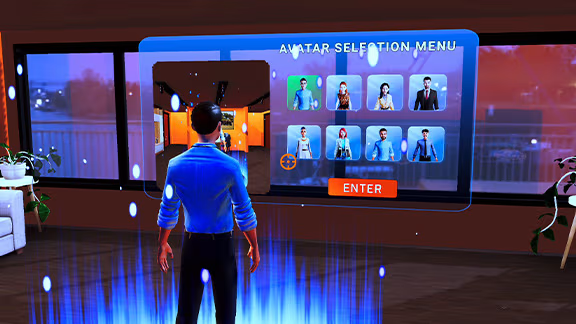 The avatar creator with its virtual mirror. Source: Riseup Labs, MOffice
The product that Riseup Labs shows today follows a clear path through the office:
- Welcome screen with an onboarding animation and a clear route into avatar creation.
- Avatar creator with a live preview in a virtual mirror, so people see changes as they make them.
- Lobby and reception with a virtual receptionist who greets people at the entrance.
- Office exploration with WASD keys or the mouse, and smooth avatar movement.
- Employee and CEO rooms with their own furniture and decor, to give each role a sense of ownership.
- Conference room for informal meetings, presentations and video on a virtual monitor.
- Technology room for tech discussions and team work, plus a hologram area for showing products.
- Large and small meeting rooms, for group discussion or quieter one-to-one talks.
- Real-time chat and voice, one to one or in groups.
- Gestures such as waving, clapping and sitting.
- Photorealistic textures, dynamic lighting and sound, for a stronger sense of presence.
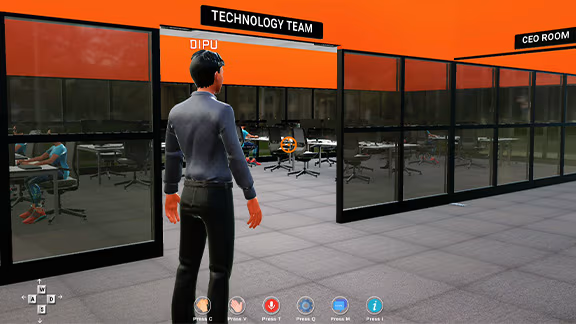 The walking space between rooms, with labelled zones. Source: Riseup Labs, MOffice
The layout reads like a real office on purpose. Labelled zones, glass walls and open walkways let people see where others are and where to go next. The controls bar at the bottom of the screen keeps gestures, voice and chat one key away.
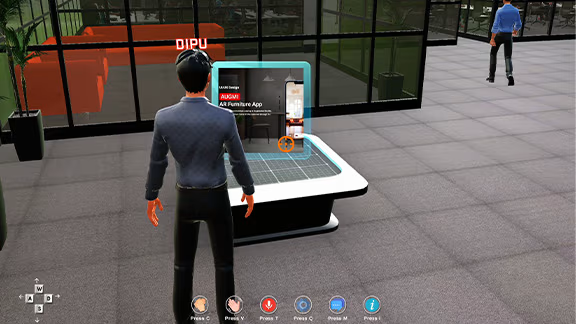 The hologram area, used to present products inside the office. Source: Riseup Labs, MOffice
The business case sits in the same rooms. The conference room and hologram area turn the office into a place to present work to clients, not only a place to chat. Riseup Labs’ planned features push further in that direction: companies would be able to apply their own branding, set up event spaces, and book rooms that come with whiteboards, agendas, screen sharing and recordings.
Impact
There are no public usage numbers for MOffice, so I do not quote any. What it produced:
- A defined product, from MVP to MMP, with a spatial blueprint the team built against (2023).
- Clear requirements in a PRD, MRD and BRD, so design, engineering and business worked from one picture (2023).
- A working web-based 3D office that Riseup Labs presents as an end-to-end product on its site today.
- A public roadmap of next features, from meeting tools to an AI assistant, that builds on the same spatial model.
Stack
- Unity (3D environment, avatar movement, real-time workspace)
- C# (core logic and interactions)
- Web-based delivery (no headset required)
How I shaped it
- Spatial blueprint. As DRI, I created the 3D UX wireframe that set the office layout: the rooms, the paths between them and how people move through the space. It became the blueprint for the build, so engineers and 3D artists were not guessing where things went.
- Discovery for a new category. Ran feature, competitor and market analysis to decide what a virtual office needs to feel useful, not just novel.
- User analysis. Looked at the two audiences separately: remote teams who need daily presence, and businesses who need a branded space for meetings and events.
- Clear requirements. Wrote the roadmap, PRD, MRD and BRD, so design, engineering and business worked from the same picture.
- Staged goals. Set data-sequenced KPIs from MVP to MSP to MMP, so each release had a clear bar to clear before the next. In a category full of impressive demos, staged goals kept the team honest about what was actually working.
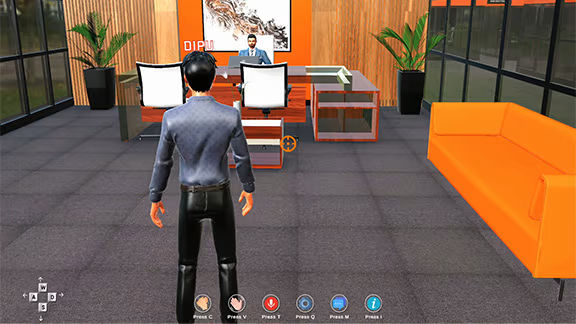 The CEO room, one of the role-based spaces. Source: Riseup Labs, MOffice
How it moved on
- 2023: product definition, 3D UX wireframe and staged roadmap under my ownership.
- Mar 2024: I moved on from Riseup Labs.
- Today: Riseup Labs showcases MOffice on its site as a web-based virtual office platform.
- Next, per Riseup Labs: advanced meeting rooms (booking, whiteboards, notes, screen sharing, agendas and recordings), space management, company branding and event spaces, personal workspaces, social events and an AI assistant.
Links
- Riseup Labs: MOffice: official product page with features, screens, stack and planned features
- Riseup Labs: the company that built MOffice
- Microsoft Mesh in Teams: 3D immersive spaces in Microsoft Teams, generally available January 2024
- UploadVR: Meta shutting down Horizon Workrooms: category context, January 2026
- Gather: a 2D browser-based virtual office, for comparison
- Jeeto.Online: the gaming product I owned at Riseup Labs at the same time